
Envelope summary report
A summary of Envelope names and balances.
Overview
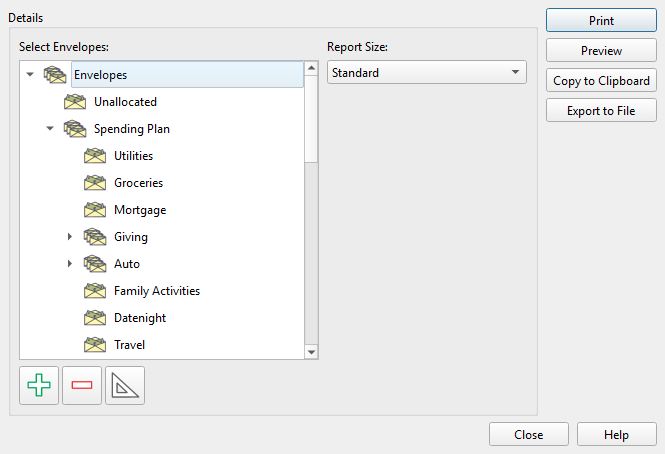
The Envelope summary report lists selected Envelopes with their current balances. Open it by clicking the print button in the Envelope list toolbar and selecting Envelope summary.
Envelope selection
The left side of the dialog shows a tree view of all your Envelopes. Select the Envelopes you want to include in the report. Three toolbar buttons control selection:
- Select all Envelopes – Selects every Envelope.
- Clear selection – Selects nothing.
- Select Allocation Plan – Selects only Envelopes that are included in the Allocation Plan.
Your selections are remembered between sessions.
Report size
A Report size: drop-down on the right side chooses the paper format:
| Format | Description |
|---|---|
| Standard | Letter-size portrait with column headers and page numbers. |
| Business cards | Compact portrait cards, nine per page. |
| Business cards (Avery) | Landscape cards formatted for Avery label sheets, ten per page. |
| Organizer 3.75 x 6.75 | Small organizer pages in landscape. |
| Organizer 4.25 x 6.75 | Medium organizer pages in landscape. |
| Organizer 5.50 x 8.50 | Large organizer pages in landscape. |
The standard format includes a header row with "Envelope" and "Balance" column labels, a report title, and a page/date footer. The compact card formats omit headers for a more condensed layout.
Your format selection is remembered between sessions.
Output options
| Button | Description |
|---|---|
| Sends the report to your printer. | |
| Preview | Opens a print preview window. |
| Copy to clipboard | Copies the report as tab-delimited text (Envelope name and balance). |
| Export to file | Saves the report as a CSV file. |
Note: The entire help system is available as a single Markdown file suitable for teaching your favorite AI agent to be your personal Principal Plan expert. Download