
Settings — Miscellaneous
Messages, import, formatting, transfer, and search options.
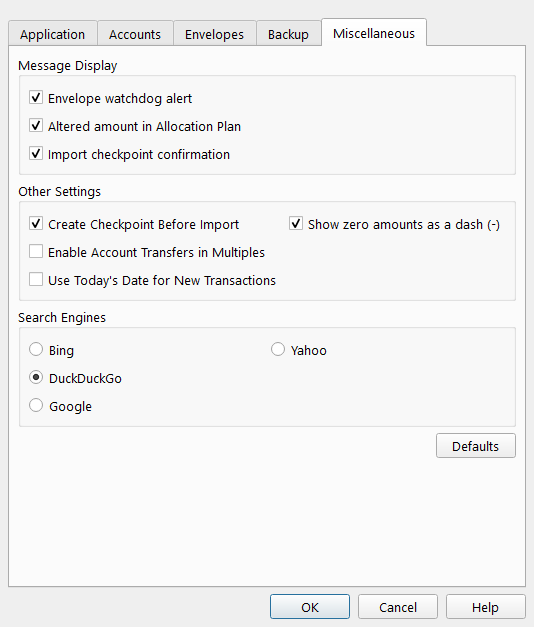
Overview
The Miscellaneous tab of the Settings dialog collects settings that do not belong to a single ledger or backup workflow.
Message Display
Unchecking a message suppresses that prompt. The underlying action still occurs, but without a confirmation or warning dialog.
| Setting | Description |
|---|---|
| Envelope watchdog alert | Shows a warning when an envelope balance drops below its watchdog limit. |
| Altered amount in Allocation Plan | Shows a notification when the Allocation Plan normalizes cell values after you change an amount. |
| Import checkpoint confirmation | Shows a confirmation when a checkpoint is created before an import. |
Other Settings
| Setting | Description |
|---|---|
| Create Checkpoint Before Import | Automatically saves a checkpoint of your data file before any import operation. This provides a restore point if the import produces unexpected results. |
| Enable Account Transfers in Multiples | Allows Regular Multiple transactions to include account-transfer rows. Each account-transfer row moves part of the transaction amount to another account and reduces the main transaction amount. |
| Show zero amounts as a dash (-) | Displays zero amounts as a dash instead of a numeric zero. |
| Use Today's Date for New Transactions | Sets the date of a new transaction to today's date. When off, a new transaction uses the date of the last transaction you entered. |
Search Engines
Select the web search engine used when Principal Plan opens a web search in your default browser.
| Engine | Description |
|---|---|
| Bing | Searches using Microsoft Bing. |
| DuckDuckGo | Searches using DuckDuckGo. |
| Searches using Google. | |
| Yahoo | Searches using Yahoo. |
A Defaults button resets all Miscellaneous tab settings to their factory values.
Note: The entire help system is available as a single Markdown file suitable for teaching your favorite AI agent to be your personal Principal Plan expert. Download