
Settings — Envelopes
Envelope list and ledger display options.
Overview
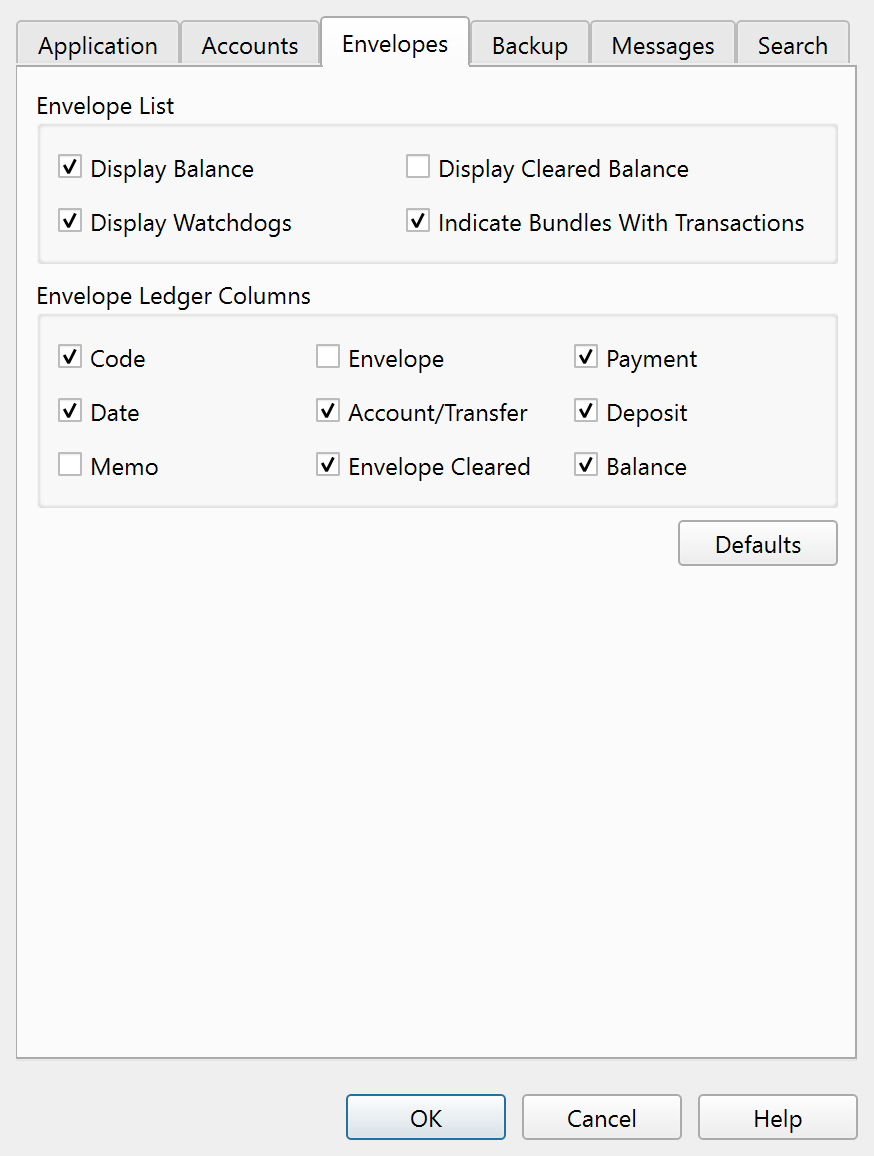
The Envelopes tab of the Settings dialog controls what information is displayed in the envelope list sidebar and which columns appear in the envelope ledger.
Envelope List
These checkboxes control what is shown next to each envelope in the sidebar:
| Setting | Description |
|---|---|
| Display Balance | Shows the envelope balance. |
| Display Cleared Balance | Shows the cleared (reconciled) balance. |
| Display Watchdogs | Shows watchdog indicators next to envelopes that have a watchdog limit set. |
| Indicate Bundles With Transactions | Marks bundle (group) envelopes that have transactions assigned directly to them. Transactions on bundle envelopes can indicate a data organization issue. |
Envelope Ledger Columns
Nine checkboxes control which columns are visible in the envelope ledger. The default state is shown in parentheses:
| Column | Default |
|---|---|
| Code | On |
| Date | On |
| Memo | Off |
| Envelope | Off |
| Account/Transfer | On |
| Envelope Cleared | On |
| Payment | On |
| Deposit | On |
| Balance | On |
A Defaults button resets all Envelopes tab settings to their factory values.
Note: The entire help system is available as a single Markdown file suitable for teaching your favorite AI agent to be your personal Principal Plan expert. Download