Transaction filter
Filter the Transactions displayed in a Ledger.
Overview
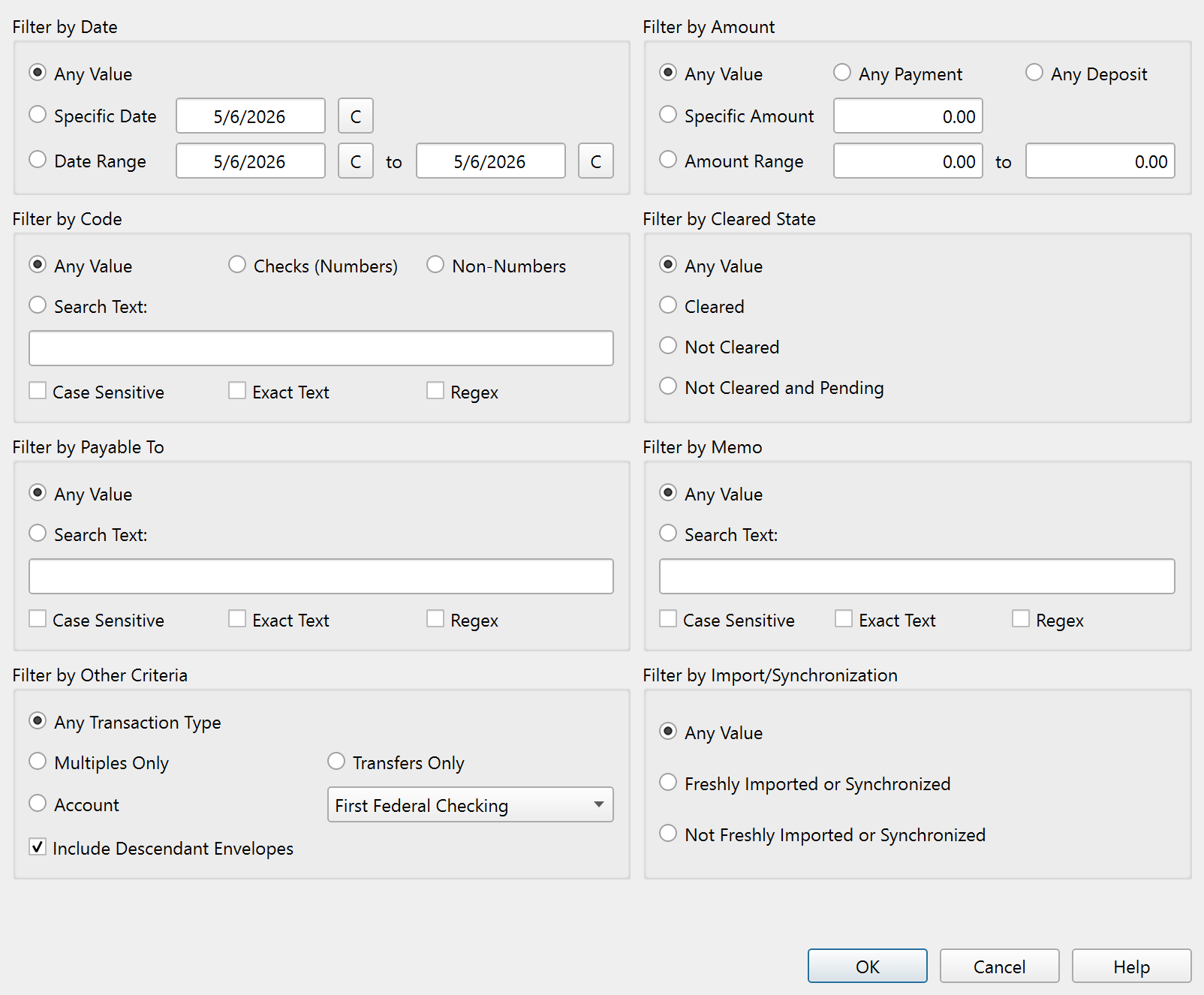
The Transaction view filter and settings dialog controls which Transactions are visible in the Ledger. Open it by clicking the filter button in the Ledger toolbar and selecting Advanced.
The dialog contains eight filter groups arranged in a grid. Each group is independent, so you can combine filters from multiple groups to narrow the display precisely.
Filter by date
- Any value – Shows Transactions from all dates.
- Specific date – Shows Transactions on a single date. A calendar button opens a date picker.
- Date range – Shows Transactions within a From and To range. Both fields have calendar buttons.
Filter by amount
- Any value – Shows all amounts.
- Any payment – Shows only payments (negative amounts).
- Any deposit – Shows only deposits (positive amounts).
- Specific amount – Shows Transactions matching an exact amount.
- Amount range – Shows Transactions within a From and To amount range.
Filter by code
- Any value – Shows all codes.
- Checks (numbers) – Shows only Transactions with numeric codes (check numbers).
- Non-numbers – Shows Transactions with non-numeric or blank codes.
- Search text – Shows Transactions where the code matches a search string.
- Match options: Case sensitive, Exact text, Regex.
Filter by cleared state
- Any value – Shows all clearing states.
- Cleared – Shows only cleared Transactions.
- Not cleared – Shows only uncleared Transactions.
- Not cleared and pending – Shows uncleared and pending Transactions.
Filter by payable to
- Any value – Shows all payees.
- Search text – Shows Transactions where the payee matches a search string.
- Match options: Case sensitive, Exact text, Regex.
Filter by memo
- Any value – Shows all memos.
- Search text – Shows Transactions where the memo matches a search string.
- Match options: Case sensitive, Exact text, Regex.
Filter by other criteria
- Any Transaction type – Shows all Transaction types.
- Multiples only – Shows only multi-split Transactions.
- Transfers only – Shows only Transfer Transactions.
- Envelope / Account – Shows Transactions assigned to a specific Envelope (in Account Ledgers) or Account (in Envelope Ledgers), selected from a drop-down.
- Include descendant Envelopes – When filtering by Envelope, also includes Transactions in its descendant Envelopes (child Envelopes at every level below it).
Filter by import/synchronization
- Any value – Shows all Transactions.
- Freshly imported or synchronized – Shows only recently imported Transactions.
- Not freshly imported or synchronized – Hides recently imported Transactions.
Text search options
The Code, Payable to, and Memo filters each support three matching options:
- Case sensitive – Distinguishes between uppercase and lowercase letters.
- Exact text – Requires the entire field to match, not just a substring.
- Regex – Treats the search text as a regular expression.
Typing in any text field automatically selects the corresponding search option.
Buttons
| Button | Description |
|---|---|
| OK | Applies the filter settings and closes the dialog. |
| Cancel | Discards changes and closes the dialog. |
| Help | Opens this help topic. |
Note: The entire help system is available as a single Markdown file suitable for teaching your favorite AI agent to be your personal Principal Plan expert. Download