
Account Properties
Create or edit an account.
Overview
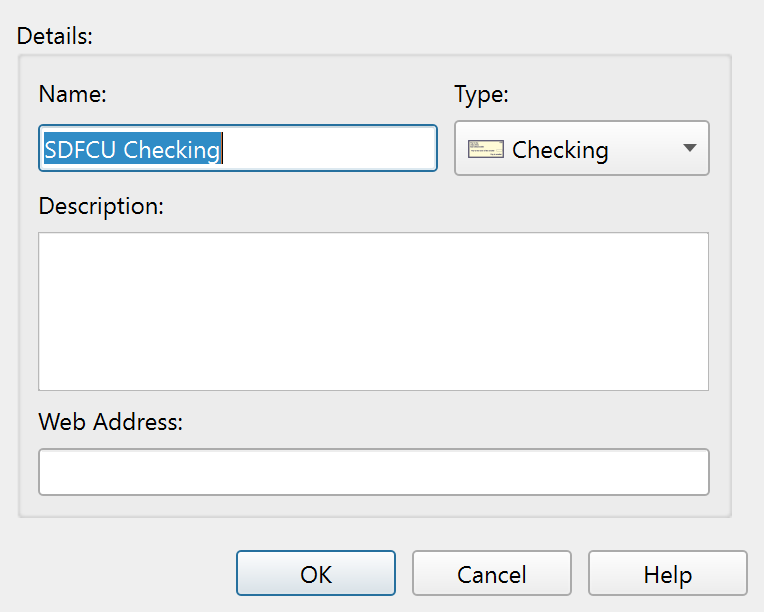
The Account Properties dialog creates a new account or edits an existing one. Open it by right-clicking an account in the Account List and selecting Edit Properties, or by using the add button to create a new account.
Details
The dialog contains account details.
| Field | Description |
|---|---|
| Name | The display name of the account. Must be unique and non-blank. |
| Type | The account type, selected from a drop-down list. See the type list below. |
| Description | An optional free-text description of the account. |
| Web Address | An optional URL linking to the institution's website. This is used by the Open Website button in the Account List toolbar. |
To enter an opening balance, create the account first, then add an opening transaction in the account ledger.
Account Types
For regular accounts, the Type drop-down offers 19 account types:
Principal Plan treats all regular account types the same internally. The selected type only assigns the icon shown for the account.
| Type | Description |
|---|---|
| Checking | A standard checking account. |
| Savings | A savings account. |
| Credit Card | A credit card. The balance represents the amount owed. |
| Cash | Physical cash on hand. |
| E-Cash | Electronic cash accounts such as PayPal or Venmo. |
| Investment | General investment accounts. |
| Loan | A personal or auto loan. |
| Mortgage | A home mortgage. |
| Retirement | Retirement accounts such as 401(k) or IRA. |
| Brokerage | A brokerage or trading account. |
| HSA | A Health Savings Account. |
| Crypto | Cryptocurrency wallets and exchanges. |
| Prepaid | Prepaid debit cards. |
| Money Market | A money market account. |
| CD | A certificate of deposit. |
| Business | A business or commercial account. |
| Property | Real estate or other property assets. |
| Insurance | Insurance policies with a cash value. |
| Gift Card | Gift cards and store credit. |
Each type has its own icon in the account list.
Group Accounts
When creating or editing a Group account, the dialog behaves differently:
- The Type drop-down shows only the Group option.
- The Web Address field is hidden.
Group accounts serve as organizational folders. They cannot be changed to a regular account type, and regular accounts cannot be changed to groups.
Allowed Account Names
Account names must be filled in and unique. If the name is blank, or if another account or group already uses the same name, Principal Plan shows a warning and asks you to enter a different name.
Buttons
| Button | Description |
|---|---|
| OK | Saves the changes and closes the dialog. |
| Cancel | Discards changes and closes the dialog. |
| Help | Opens this help topic. |
Note: The entire help system is available as a single Markdown file suitable for teaching your favorite AI agent to be your personal Principal Plan expert. Download