Envelope Ledger
The Transaction register for a single Envelope.
Overview
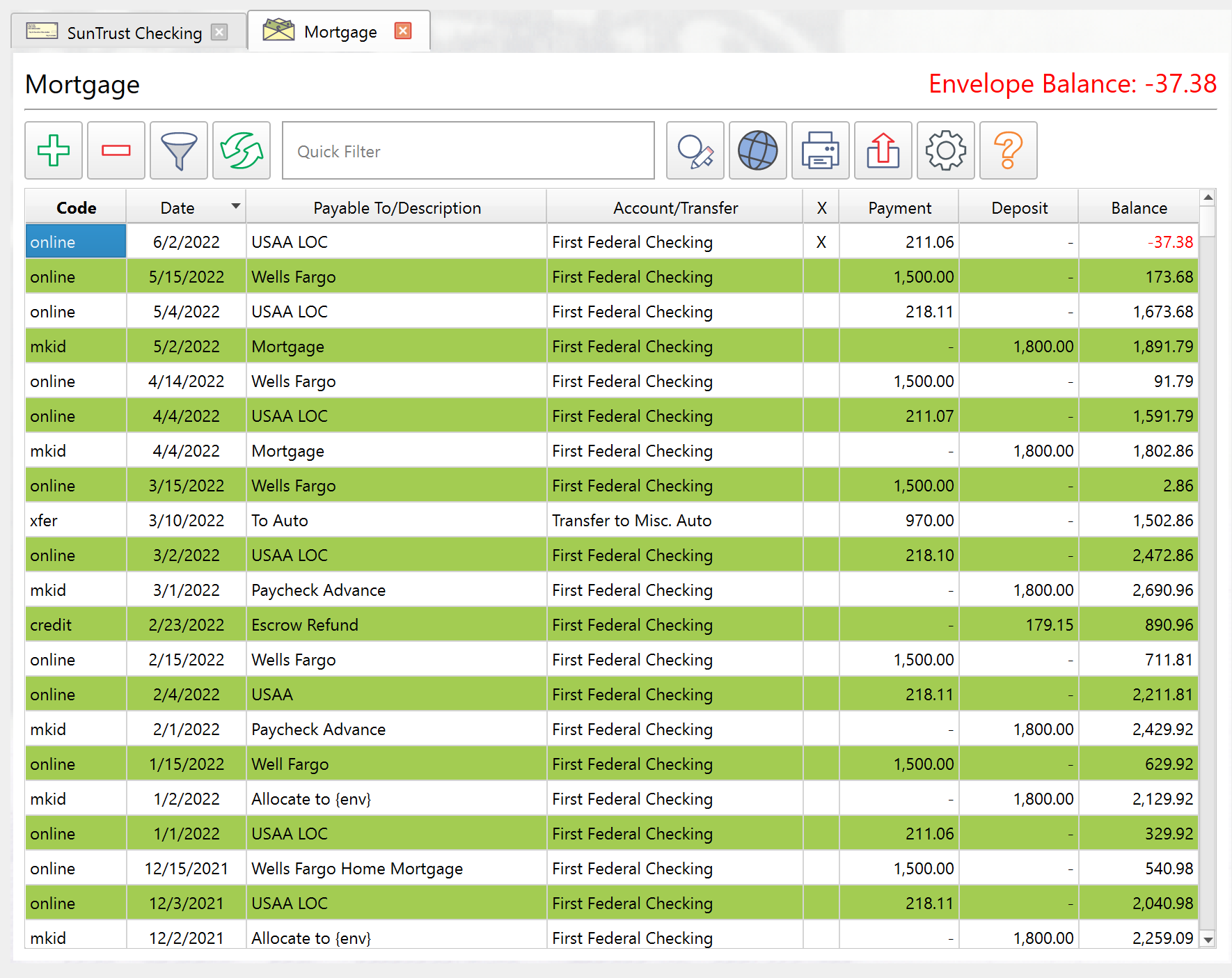
The Envelope Ledger shows all Transactions assigned to a single Envelope. It opens as a tab when you double-click an Envelope in the Envelope list or choose View > Envelope Ledger from the menu bar.
The Envelope Ledger shares the same layout and most of the same functionality as the Account Ledger. This topic covers the differences. See the Account Ledger topic for full details on columns, toolbar buttons, keyboard shortcuts, and filtering.
Differences from the Account Ledger
Column headers
The Ledger displays the columns listed in the Account Ledger topic, with the header differences listed below. Column visibility and width are configurable through the settings button.
| Account Ledger | Envelope Ledger |
|---|---|
| Payable to | Payable to/description |
| Envelope/Transfer | Account/Transfer |
The details column shows the linked Account name (instead of the linked Envelope name) for simple Transactions. For Transfers, it shows the Transfer target.
Clearing
Clicking the cleared column or using Toggle cleared toggles the Envelope clearing state rather than the Account clearing state. The two clearing states are independent, so clearing a Transaction in the Envelope Ledger does not affect its Account clearing state.
Use Envelope clearing when you want to track which items in this budget category are still open – for example, reimbursable medical or business expenses paid from several Accounts. Uncleared items are still outstanding for that purpose; clear them when they are reimbursed or otherwise settled. When enabled, the Envelope cleared balance in the Envelope list reflects that tracking. See Principal Plan's Envelope model and Reconciling an Account.
Context menu
The right-click menu offers Insert new multiple Transfer instead of Insert new multiple. This reflects that multi-split Transactions created from the Envelope Ledger are Envelope splits rather than Account splits.
Toolbar and appearance
The Ledger background uses a distinct color to visually differentiate it from the Account Ledger.
Everything else
All other features work identically to the Account Ledger:
- The same configurable columns appropriate to the Envelope Ledger (with the header differences noted above).
- The same toolbar buttons for creating, deleting, filtering, searching, printing, and exporting Transactions.
- The same keyboard shortcuts (F5, Ctrl+Enter, Ctrl+Insert, Ctrl+Delete, Ctrl+X, Ctrl+H, Ctrl+Q, Ctrl+Home, Ctrl+End).
- The same filter presets (View all, View pending, etc.) and the same advanced filter dialog with eight filter categories.
- The same print, preview, export, and copy-to-clipboard functionality.
Note: The entire help system is available as a single Markdown file suitable for teaching your favorite AI agent to be your personal Principal Plan expert. Download