Import Transactions — Advanced
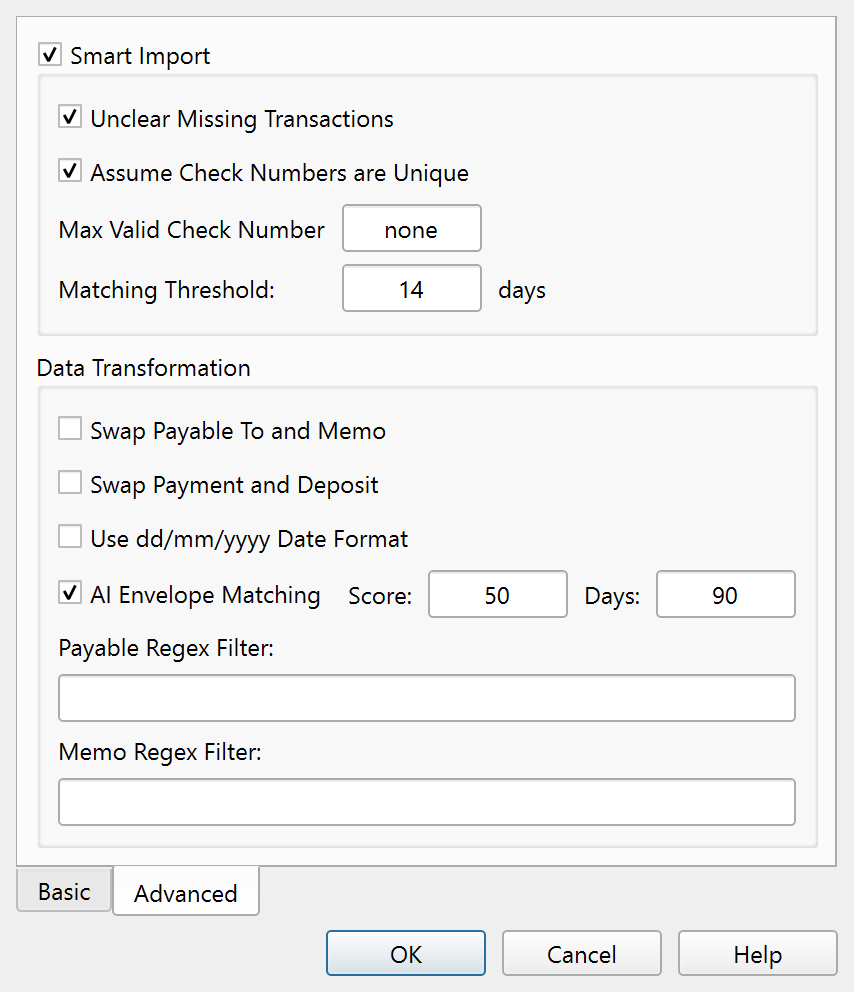
The Advanced tab of the import dialog.
Overview
The Advanced tab of the Import Transactions dialog provides duplicate detection, field transformations, and AI-powered Envelope matching. These settings fine-tune how imported Transactions are processed and matched against your existing records.
Smart import
The Smart import group is a toggleable section that enables automatic duplicate detection. When enabled, imported Transactions are compared against existing records using amount, date proximity, payee similarity, and optionally check number uniqueness.
| Setting | Description |
|---|---|
| Unclear missing Transactions | Unclears existing cleared Transactions within the matching window that have no corresponding imported Transaction. This helps flag Transactions that may have been removed by the bank. |
| Assume check numbers are unique | Treats check numbers as unique identifiers when matching. Two Transactions with the same check number are considered the same record. |
| Max valid check number | Sets the highest check number the importer treats as a real check. Numbers above this threshold are ignored during check-number matching. |
| Matching threshold: | The largest difference, in days, between an imported Transaction's date and an existing Transaction's date for the two to be considered a match. It also sets the matching window: existing cleared Transactions more than this many days older than the oldest imported Transaction are not compared. A lower value requires closer dates. The default is 5. |
Data transformation
The Data transformation group contains field-level corrections that adjust the imported data before it is written to the Ledger.
| Setting | Description |
|---|---|
| Swap payable to and memo | Exchanges the payee and memo fields. Useful when a bank file stores the description in the memo column. |
| Swap payment and deposit | Exchanges the payment and deposit amounts. Useful when a bank file reverses the sign convention. |
| Use dd/mm/yyyy date format | Parses dates in day/month/year order instead of month/day/year. Enable this for international bank files. |
| AI Envelope matching | Automatically assigns Envelopes to imported Transactions based on payee similarity to past Transactions. |
| Score: | The minimum similarity score an AI Envelope match must reach to be applied. Higher values require closer matches. |
| Days: | The number of days of Transaction history the AI examines when looking for payee matches. |
| Payable regex filter: | A regular expression applied to the payee field before matching. Use this to strip bank-added prefixes or suffixes that interfere with matching. |
| Memo regex filter: | A regular expression applied to the memo field before matching. |
Per-Account settings
All Advanced tab settings are saved on the selected Account and restored when you next import into the same Account.
Note: The entire help system is available as a single Markdown file suitable for teaching your favorite AI agent to be your personal Principal Plan expert. Download